Kindle Jailbreak Compatibility Quick Reference
Covers all current and discontinued Kindle models · Firmware version requirements for jailbreaking each model
How to check your firmware version: On your Kindle: Menu → Settings → Menu → Device Info, where you will see the "Firmware Version".
Before jailbreaking: To prevent your Kindle from auto-updating during the jailbreak process, it is strongly recommended to fill the storage to leave less than 100MB free and delete any .bin files from the root directory of your Kindle.
| Model | Jailbreakable Firmware | Status | Tutorial |
|---|---|---|---|
| Kindle 11, KPW 5/6, Scribe 1/2, Colorsoft | ≤5.19.6 | Specific firmware only | View Tutorial |
| Kindle 11(KT 4/5/6)、KPW 4/5/6、KO3、Scribe 1/2、Colorsoft | 5.16.3~5.19.5 | Specific firmware only | View Tutorial |
| All Kindle models | 5.16.4 ~ 5.18.3 | Specific firmware only | View Tutorial |
| KPW5, Kindle 10/11 | 5.19.2 or 5.18.1.1.1 | Specific firmware only | View Tutorial |
| KPW5, Kindle 11, KO3 | 5.16.4~5.18.6 | Specific firmware only | View Tutorial |
| All Kindle models | 5.18.1 ~ 5.18.5 | Specific firmware only | View Tutorial |
| All Kindle models | <5.18.1 | Specific firmware only | View Tutorial |
| KS, KO 1/2/3, KV, Kindle 7/8/10/11, KPW 2/3/4/5 | ≤5.16.2.1.1 | Specific firmware only | View Tutorial |
| KO 1/2/3, KV, Kindle 7/8/10, KPW 2/3/4/5 | 5.12.2.2 ~ 5.14.2 | Specific firmware only | View Tutorial |
| KO 1/2/3, KV, Kindle 7/8/10, KPW 2/3/4 | 5.10.3 ~ 5.13.3 | Specific firmware only | View Tutorial |
| KPW4 | 5.10.2 ~ 5.13.3 | Specific firmware only | View Tutorial |
| KPW4 | 5.10.0.1~5.10.1.3 | Specific firmware only | View Tutorial |
| KPW3 | 5.8.9.0.1 or 5.9.6.1 | Specific firmware only | View Tutorial |
| K10 | 5.11.0 | Specific firmware only | View Tutorial |
| KO2 | 5.9.0.5.1 or 5.9.0.6 | Specific firmware only | View Tutorial |
| KO 1/2, KV, KPW 2/3/4, K7/8/10 | ≤5.8.7 | Special firmware required | View Tutorial |
| KPW2, K5, KT, KPW1, and KT2 | ≤5.4.5.1 | Firmware downgrade required | View Tutorial |
| KPW1 | <5.4.4 | Firmware downgrade required | View Tutorial |
Risk notice: AdBreak is currently experimental and not fully tested. Proceed with caution at your own risk. Also note that since firmware 5.16.3 the Kindle only supports HF-version plugins.
MobileRead user hhhhhhhhh released a new jailbreak called AdBreak. It triggers an arbitrary-code-execution bug in the browser by opening ads, and currently works only on ad-supported Kindles.
Note: The method only uses an ad link to trigger the browser bug — it does not remove ads. The author says it exploits an old WebKit flaw, CVE-2012-3748, building on code from Chris Evans's blog post.
Requirements
The Kindle must support ads and be bound to a working Amazon account.
Firmware must be in the range
5.18.1 – 5.18.5.A computer and a USB cable that transfers data.
WinterBreak was patched from firmware 5.18.1, so AdBreak switches to triggering the bug via ads — meaning the device must display ads. The Scribe and Colorsoft were never offered with ads and may not work; for other non-ad models, try enabling «SPECIAL OFFERS» manually on the device page in your Amazon account (you can turn it off again after jailbreaking).
Download
All required files are packed into adbreak.zip — download and unzip it:
Download: MobileRead thread | Baidu Netdisk
Special handling for firmware 5.18.5.0.1
On firmware 5.18.5.0.1 you may hit version number is xxxxxx. Follow the fix by MobileRead user gt346 and edit adbreak.html first:
Open the file in a code editor and find
const offsets = {.Locate the line whose comment matches your device and closest firmware, duplicate it, and change the key to the six digits in the error message.
Example: 12th-gen Paperwhite on 5.18.5.0.1 with error version number is 455680. Find the line commented // fs_update_kindle_all_new_paperwhite_12th_5.18.5:
'454604': { memcpy_got: 0xbe4ac, xml_got: 0xbebd8, memcpy_offset: 0x94c00, system_offset: 0x42938 }, // fs_update_kindle_all_new_paperwhite_12th_5.18.5Duplicate it and change the key to 455680:
'455680': { memcpy_got: 0xbe4ac, xml_got: 0xbebd8, memcpy_offset: 0x94c00, system_offset: 0x42938 }, // fs_update_kindle_all_new_paperwhite_12th_5.18.5.0.1Steps
Check the firmware — it must be no higher than 5.18.5.
Make sure the Kindle is online and signed into an Amazon account.
Wait until lock-screen ads appear (if they never show, back up important files and reset the device).
Unlock, enter the Kindle, and turn on Airplane Mode.
Tap the top-right menu and choose View all ads; confirm several ads are listed.
Connect via USB and enable hidden files in your file manager (Windows: Folder Options → View → show hidden files; macOS:
Command + Shift + .).Open the
systemfolder at the Kindle root and copy the.assetsfolder to your desktop.Copy the 5 files from adbreak.zip into the desktop
.assetsfolder.Replace the contents of every
details.htmlwithadbreak.html:Windows: double-click
replace.bat.macOS / Linux: run
cd ~/Desktop/.assets && find . -name 'details.html' -exec cp adbreak.html {} \;
Delete the original
.assetsin Kindlesystemand copy the modified one in.Tap an ad on the Kindle; a dialog with Bang! appears. Tap Close or OK — the jailbreak script runs automatically:
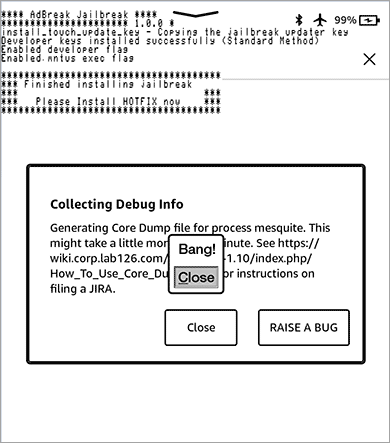
The Bang! dialog after tapping an ad
Done.
Note: A «Unable to launch the selected application, please retry» message after the Bang! dialog does not affect the jailbreak.
Installing the patch
The Hotfix prevents the jailbreak from breaking after firmware updates, but patches lag behind Amazon releases — disable automatic updates for the best protection.
Download Hotfix: Official releases
Connect via USB and copy the
.binfile to the Kindle root.Eject, then go to Settings → Update Your Kindle to install.
Wait for the restart, then tap the book named Run Hotfix.
Note: Tap Run Hotfix again after every firmware update.
Installing plugins
Since firmware 5.16.3 the EABI is armhf, so you need HF-capable plugins (e.g. MRPI and KOReader — listed on that page). For non-HF plugins, downgrade the firmware below 5.16.3 first.
© "Ereadertoolbar" Original Article. Please credit the source and include a link back to the original post when republishing. https://ereadertoolbar.xyz/en/tutorial/article/adbreak-jailbreak-kindle-5181-5185/