Kindle Jailbreak Compatibility Quick Reference
Covers all current and discontinued Kindle models · Firmware version requirements for jailbreaking each model
How to check your firmware version: On your Kindle: Menu → Settings → Menu → Device Info, where you will see the "Firmware Version".
Before jailbreaking: To prevent your Kindle from auto-updating during the jailbreak process, it is strongly recommended to fill the storage to leave less than 100MB free and delete any .bin files from the root directory of your Kindle.
| Model | Jailbreakable Firmware | Status | Tutorial |
|---|---|---|---|
| Kindle 11, KPW 5/6, Scribe 1/2, Colorsoft | ≤5.19.6 | Specific firmware only | View Tutorial |
| Kindle 11(KT 4/5/6)、KPW 4/5/6、KO3、Scribe 1/2、Colorsoft | 5.16.3~5.19.5 | Specific firmware only | View Tutorial |
| All Kindle models | 5.16.4 ~ 5.18.3 | Specific firmware only | View Tutorial |
| KPW5, Kindle 10/11 | 5.19.2 or 5.18.1.1.1 | Specific firmware only | View Tutorial |
| KPW5, Kindle 11, KO3 | 5.16.4~5.18.6 | Specific firmware only | View Tutorial |
| All Kindle models | 5.18.1 ~ 5.18.5 | Specific firmware only | View Tutorial |
| All Kindle models | <5.18.1 | Specific firmware only | View Tutorial |
| KS, KO 1/2/3, KV, Kindle 7/8/10/11, KPW 2/3/4/5 | ≤5.16.2.1.1 | Specific firmware only | View Tutorial |
| KO 1/2/3, KV, Kindle 7/8/10, KPW 2/3/4/5 | 5.12.2.2 ~ 5.14.2 | Specific firmware only | View Tutorial |
| KO 1/2/3, KV, Kindle 7/8/10, KPW 2/3/4 | 5.10.3 ~ 5.13.3 | Specific firmware only | View Tutorial |
| KPW4 | 5.10.2 ~ 5.13.3 | Specific firmware only | View Tutorial |
| KPW4 | 5.10.0.1~5.10.1.3 | Specific firmware only | View Tutorial |
| KPW3 | 5.8.9.0.1 or 5.9.6.1 | Specific firmware only | View Tutorial |
| K10 | 5.11.0 | Specific firmware only | View Tutorial |
| KO2 | 5.9.0.5.1 or 5.9.0.6 | Specific firmware only | View Tutorial |
| KO 1/2, KV, KPW 2/3/4, K7/8/10 | ≤5.8.7 | Special firmware required | View Tutorial |
| KPW2, K5, KT, KPW1, and KT2 | ≤5.4.5.1 | Firmware downgrade required | View Tutorial |
| KPW1 | <5.4.4 | Firmware downgrade required | View Tutorial |
This jailbreak comes from MobileRead user tryol's thread KindleBreak – Software Jailbreak for (almost) any Kindle. It exploits a JPEG XR parsing flaw in the Kindle.
Supported devices
Kindle Oasis 3 (KO3), Oasis 2 (KO2), Oasis 1 (KO1)
Kindle Voyage (KV)
Kindle Paperwhite 4 (KPW4), Paperwhite 3 (KPW3), Paperwhite 2 (KPW2)
Kindle 10 (K10), Kindle 8 (K8), Kindle 7 (K7)
Note: Unsure of your model? The first six digits of the serial number identify it (e.g. sn:g000pp = KPW2). If your model isn't listed, don't proceed — see the original thread.
Supported firmware
The flaw was patched in 5.13.4; this method covers 5.10.3 – 5.13.3:
5.13.3  5.13.2  5.13.1  5.12.5  5.12.4  5.12.3
5.12.2.1.1  5.12.2.1  5.12.2  5.12.1.1  5.12.1
5.11.2  5.11.1.1  5.11.1  5.10.3
Above 5.13.3 this method won't work; below 5.10.3, upgrade to one of the versions above first. If your exact version is missing, ask for help in the original thread.
Before you begin
Remove pending firmware: if the Kindle already downloaded the latest firmware via OTA, a reboot may install it and break the next step (the Hotfix). Delete any ~200 MB firmware file at the root and hidden partial downloads (Windows: enable hidden files; macOS:
Command + Shift + .).Turn on Airplane Mode: keep the device offline to block unexpected upgrades.
Jailbreak steps
Much simpler than the special-firmware route: copy files to the root, then open one HTML page in the Experimental Browser.
Download kindle-jb-kindlebreak-1.0-r18327.tar.xz: Baidu Netdisk . Unzip to get
jb-kindlebreak.zip, unzip again, and copy these four files to the Kindle root:kindlebreak.jxrkindlebreak.htmljb.shjb
Open the menu in the top-right corner and launch the Experimental Browser. Make sure images are enabled in the browser settings (it should read "Disable Images"):
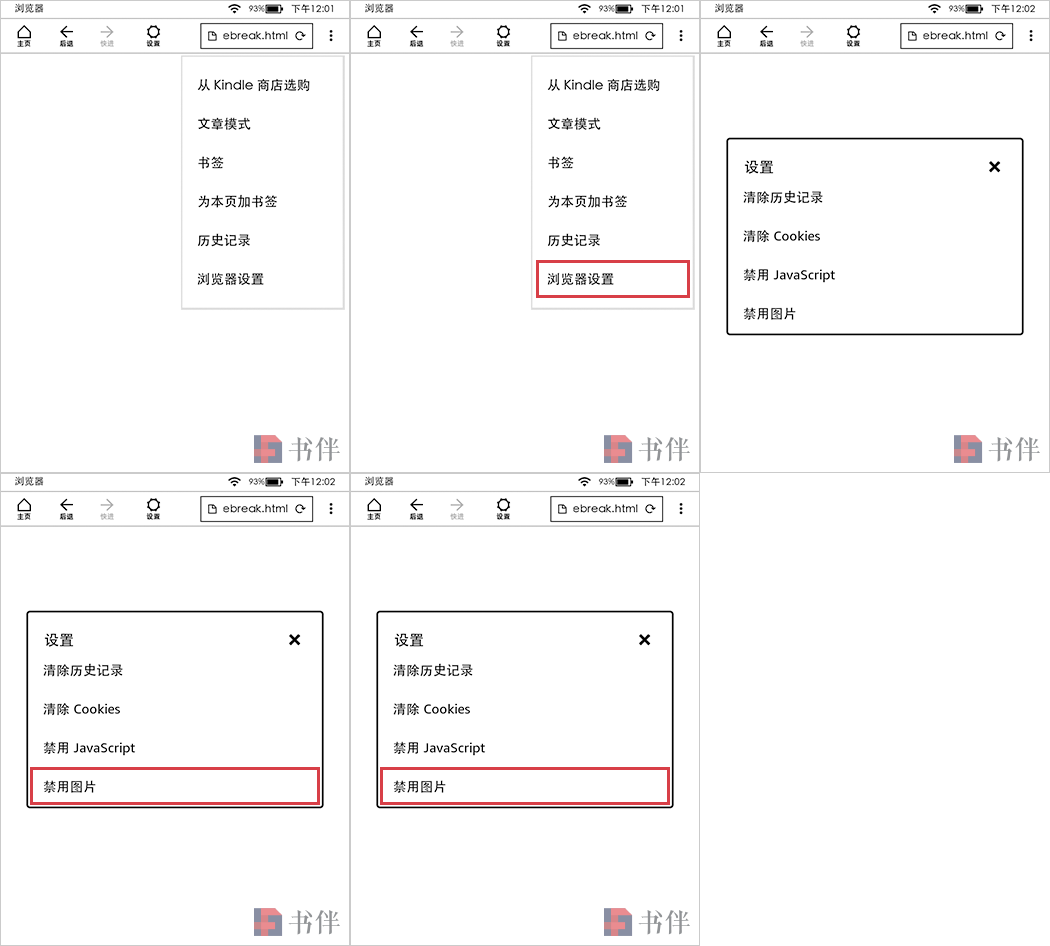
Confirm images are enabled
Enter the address below (note
file:///— one colon, three slashes):
file:///mnt/us/kindlebreak.htmlIf all goes well the Kindle restarts within seconds to minutes (device-dependent); after reboot the jailbreak is done. The files are cleaned up automatically, and a log file kindlebreak_log.txt appears at the root — keep it until you've installed the Hotfix, as it helps with debugging.
Important: Don't stop here — install the Hotfix next, otherwise ;log may not work and MRPI/KUAL installation will fail. If an error dialog appears, follow the original thread and ask there.
Installing the Hotfix
Update to the latest firmware to close the JPEG XR hole, but install the latest JailBreak Hotfix first. Also disable automatic updates.
Download JailBreak Hotfix: Official page
Connect via USB and unzip
JailBreak-x.xx.N-FW-5.x-hotfix.zipto getUpdate_jailbreak_hotfix_x.xx.N_install.bin.Copy the .bin file to the root and eject.
Tap Menu → Settings → Menu → Update Your Kindle and wait for the restart.
After reboot you can safely update firmware (with MRPI installed, drop the .bin into mrpackages and run
;log mrpi).
Installing plugins
Once the Hotfix is in, install whatever plugins you need. Important: when typing ;log, don't tap a failed history suggestion — retype it with the on-screen keyboard.
© "Ereadertoolbar" Original Article. Please credit the source and include a link back to the original post when republishing. https://ereadertoolbar.xyz/en/tutorial/article/kindlebreak-jailbreak-kindle-5103-5133/